
Virtual Team Building Games [17 Non-Cheesy Picks]
Virtual team building games for remote teams, ranked by setup time, camera load, async fit, replay value, and LearnClash use cases.

Remote work did not kill team building. It made bad team building impossible to hide.
The virtual team building games that survive contact with a real remote team are short, low-friction, and safe for mixed groups. LearnClash sits at the top of this list, and yes, it is our own app, but it also fits the constraint that decided the whole ranking: a team can pick any topic, play 18-question duels in 3-minute turns, and keep a rematch running for months without booking a single extra meeting. If that is what you came for, start a workplace culture duel right away; the other 16 games will still be here after your first turn.
Everyone else: this guide sorts five-minute openers, Zoom games, and async rituals, then covers the patterns worth avoiding. For a whole week of this, our 53 spirit week ideas for work apply the same hybrid-first thinking to dress-up, trivia, wellness, and holiday days.
Quick Comparison: 17 Virtual Team Building Games
I scored these games on setup time, camera load, equal participation, async fit, and replay value. The loud, theatrical formats did poorly. What won are the games a remote team can repeat without dreading another calendar block.
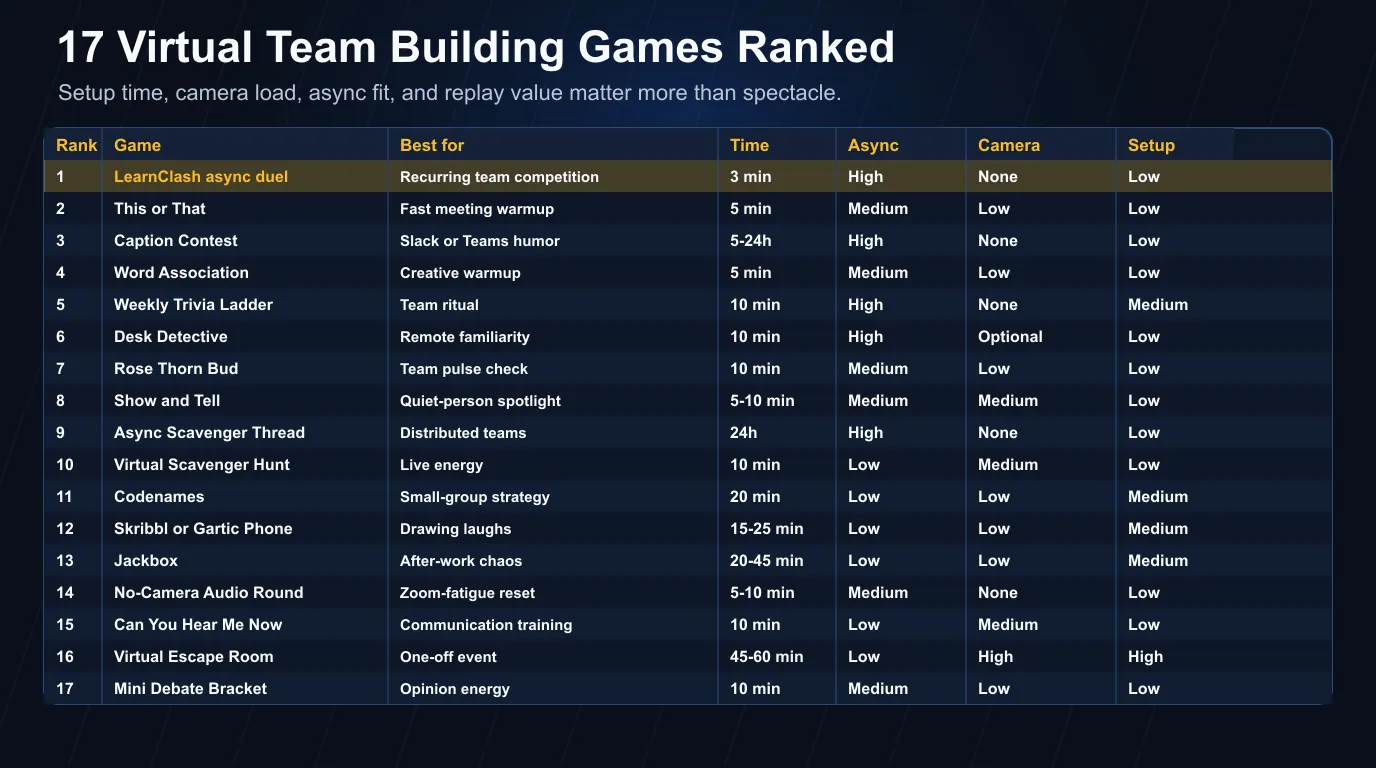 Figure 1: the pattern across all 17. Easy to explain, easy to join, worth repeating.
| Rank | Game | Best for | Time | Async fit | Camera load | Setup |
|---|---|---|---|---|---|---|
| 1 | LearnClash async duel | Recurring team competition | 3 min per turn | High | None | Low |
| 2 | This or That | Fast meeting warmup | 5 min | Medium | Low | Low |
| 3 | Caption Contest | Slack or Teams humor | 5-24h | High | None | Low |
| 4 | Word Association | Creative warmup | 5 min | Medium | Low | Low |
| 5 | Weekly Trivia Ladder | Team ritual | 10 min | High | None | Medium |
| 6 | Desk Detective | Remote familiarity | 10 min | High | Optional | Low |
| 7 | Rose Thorn Bud | Team pulse check | 10 min | Medium | Low | Low |
| 8 | Show and Tell | Quiet-person spotlight | 5-10 min | Medium | Medium | Low |
| 9 | Async Scavenger Thread | Distributed teams | 24h | High | None | Low |
| 10 | Virtual Scavenger Hunt | Live energy | 10 min | Low | Medium | Low |
| 11 | Codenames | Small-group strategy | 20 min | Low | Low | Medium |
| 12 | Skribbl or Gartic Phone | Drawing laughs | 15-25 min | Low | Low | Medium |
| 13 | Jackbox | After-work chaos | 20-45 min | Low | Low | Medium |
| 14 | No-Camera Audio Round | Zoom-fatigue reset | 5-10 min | Medium | None | Low |
| 15 | Can You Hear Me Now | Communication training | 10 min | Low | Medium | Low |
| 16 | Virtual Escape Room | One-off event | 45-60 min | Low | High | High |
| 17 | Mini Debate Bracket | Opinion energy | 10 min | Medium | Low | Low |
The ranking is biased on purpose toward attention fit, because the research on remote work keeps circling the same tension. In Gallup’s 2025 remote-work research, the fully remote group posted the best engagement number, 31%, ahead of hybrid and on-site groups, and the worst wellbeing picture: just 36% thriving, with more sadness, anger, and loneliness than their hybrid or on-site colleagues reported.
Connection clearly matters, and piling more drag onto the day clearly does not deliver it. So the winner here is never the one-hour spectacle. It is the ritual people can actually keep.
How We Ranked These Virtual Team Building Games
I put the first version of this list together in April 2026, starting from a much longer candidate pile. Anything that needed long setup, forced private disclosure, made camera time mandatory, or handed one loud teammate all the oxygen went out early. What survived favors short rules, equal turns, and scoring a team can repeat next week.
The test was deliberately narrow: could a remote manager run this game this week, inside the tools the team already pays for, without asking quiet people to perform on camera in front of everyone? No vendor demos. No theatrics.
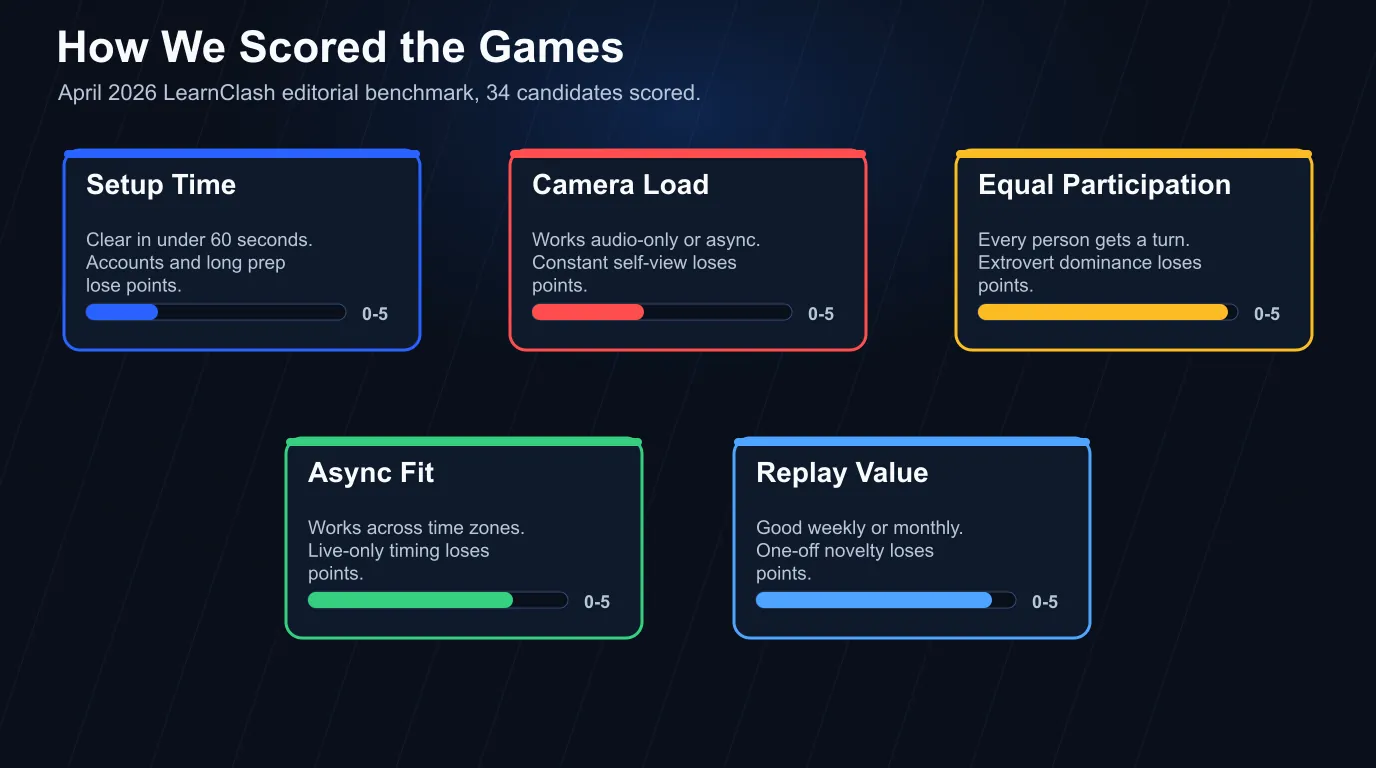 Five filters, applied in this order. Remote teams need less friction before they need more novelty.
| Filter | What earned points | What lost points |
|---|---|---|
| Setup time | Clear in under 60 seconds | Accounts, downloads, long host prep |
| Camera load | Works audio-only or async | Requires constant self-view |
| Equal participation | Every person gets a turn | Extroverts dominate |
| Async fit | Works across time zones | Everyone must attend live |
| Replay value | Good weekly or monthly | One-off novelty only |
Most listicles in this space rank by fun. Fun matters, but a remote game competes with Slack pings, late meetings, and the quiet mental cost of being watched through a grid of faces, which is why friction had to count for more than novelty. Microsoft’s 2025 Work Trend Index calls the backdrop the infinite workday: 117 emails and 153 Teams messages per average worker per weekday, with high-ping workers interrupted every two minutes during core hours. Drop a messy live hour on top of that and you are solving loneliness with more noise.
The cut line was simple. If a game takes longer to explain than to play, it is out.
Low-Friction Games for Remote Teams
The first nine entries share a spine: quick to explain, chat-native or fully async, and playable without a camera. They are ordered by how well they hold up as a recurring ritual rather than a one-off.
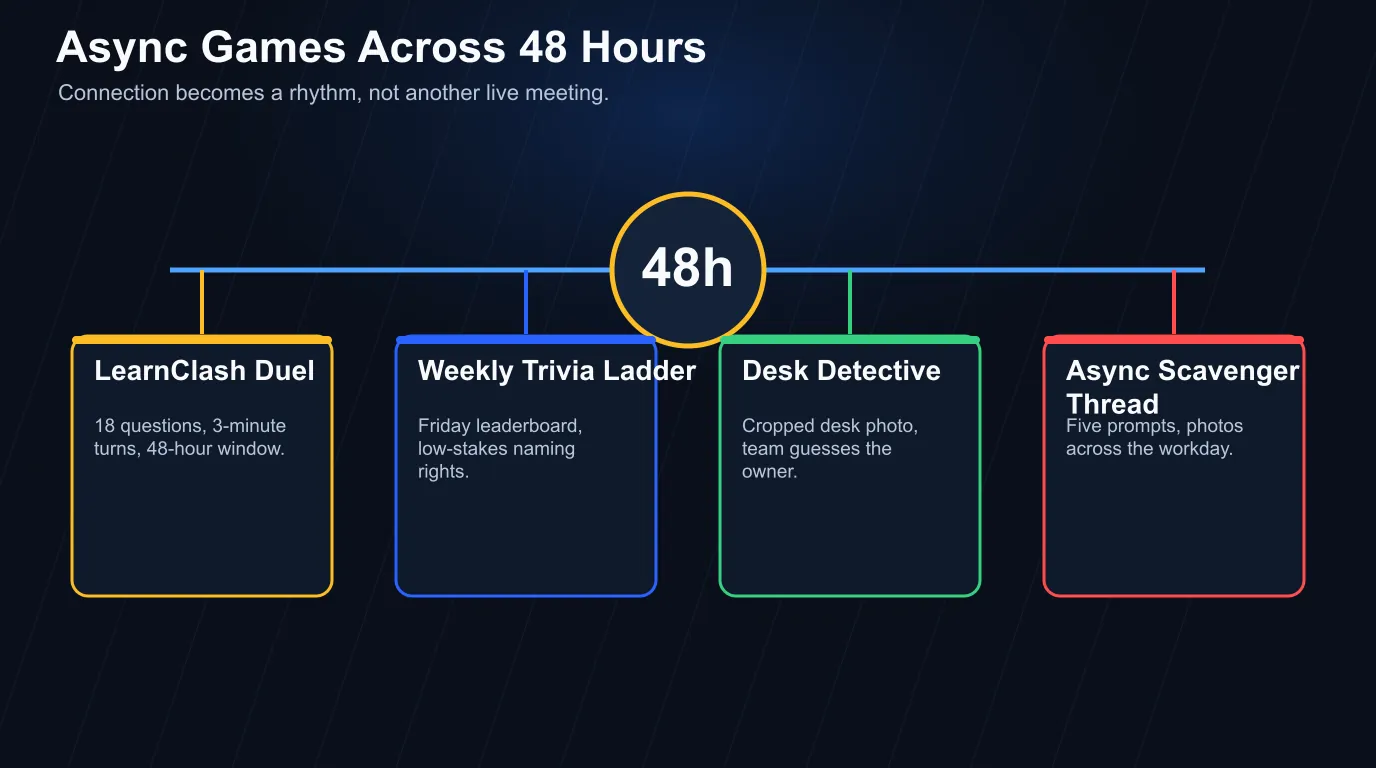
1. LearnClash async team duel
Pick one team topic and start a duel. Each duel runs 18 questions across 6 rounds, one turn takes about 3 minutes, and each player gets a 72-hour window to answer.
That 72-hour number is a founder call, not an accident. Three days is exactly long enough for a duel to survive a weekend, a sick day, or a nine-hour time-zone split without anyone forfeiting. If a game is supposed to replace a meeting, its clock has to absorb the calendar instead of fighting it.
Good team topics are broad enough that nobody feels boxed out:
- workplace and office culture
- general knowledge
- food and drink
- world geography
- 2026 pop culture
- science and technology
One correction from an earlier version of this article, since precision is the whole brand of a trivia app: we used to describe the ranking as ELO stakes. ELO is the term everyone searches for, but what LearnClash actually computes is Glicko-2, a descendant that also tracks how uncertain a rating is. For a team the effect is the same either way. The score is real, the rematch has teeth, and a missed question resurfaces later through the 3-stage spaced repetition cycle instead of vanishing with the round.
Want this without building anything?
Install LearnClash, pick a workplace topic, and let the scoreboard carry the rematch from week to week.
Install LearnClash2. This or That
Ask one binary prompt and make everyone answer in chat first, then call on two people with opposite answers. Nobody has to become interesting on command; they just pick a lane.
Good work-safe prompts:
- Async updates or live calls?
- Desk snacks or coffee rituals?
- Deep work morning or deep work afternoon?
- Slides first or notes first?
- Camera on or audio-only?
For a deeper bank, our 223 this or that questions include a whole workplace-safe section.
3. Caption Contest
Post a strange work-safe image in Slack or Teams, ask for captions, and let the group vote with reactions. It beats most virtual happy hours for one plain reason: it runs where the team already talks, so nobody sits trapped smiling at a webcam for an hour.
4. Word Association
Drop one word into chat: launch, deadline, handoff, focus, support. Everyone replies with the first word that comes to mind, and the host’s only job is to read the spread out loud.
The spread tends to teach you something. One person hears “deadline” and writes “clarity.” Another writes “panic.” You just surfaced a team norm in 45 seconds.
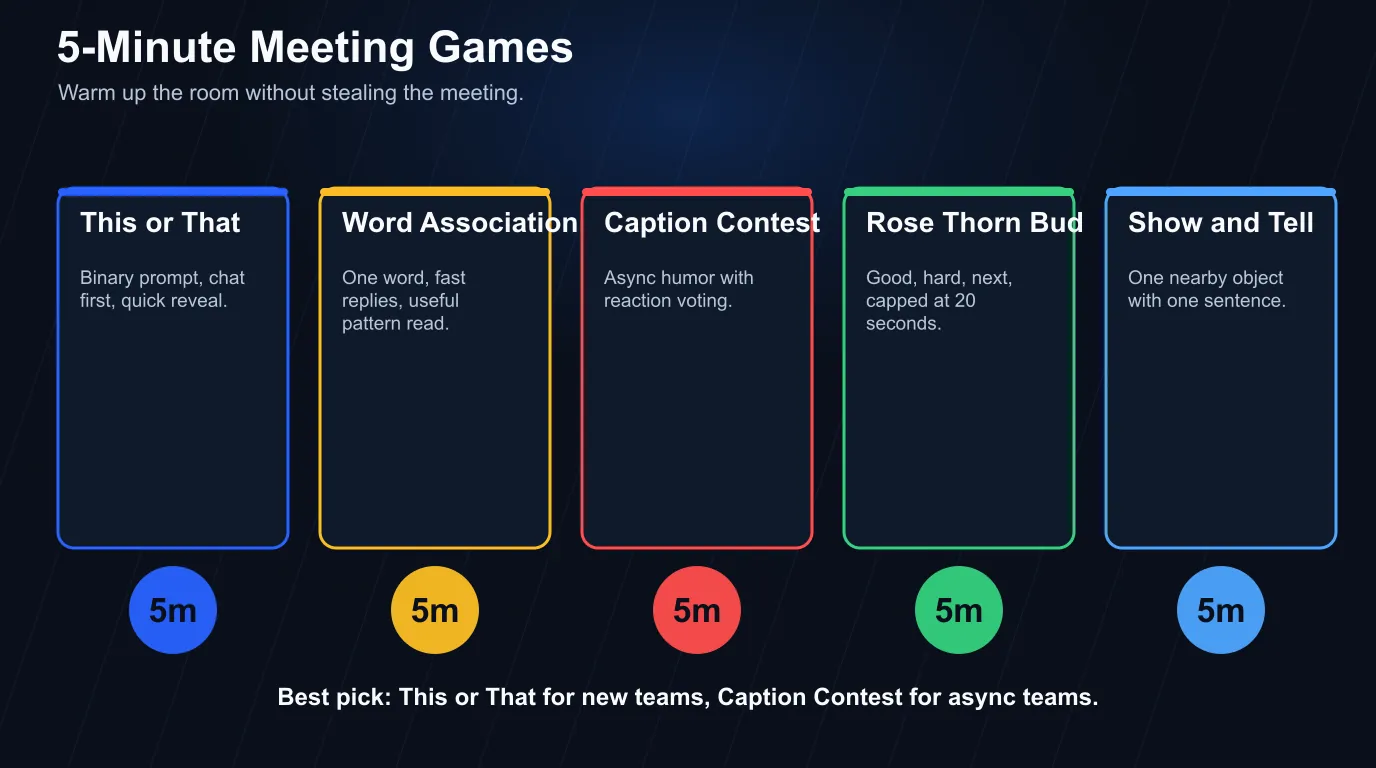 Openers should make the room warmer without stealing the meeting.
5. Weekly trivia ladder
Create a weekly five-question challenge and post the leaderboard on Friday. Keep it low-stakes; no prizes beyond naming rights for next week’s topic.
It pairs cleanly with team building trivia questions. Reach for trivia when the team wants answers, scoring, and a clear winner, and for ice breaker questions when the goal is just conversation.
6. Desk Detective
Ask each teammate to send one cropped photo from their desk (mug, sticky note, plant, keyboard, cable disaster), then have the team guess whose desk it is. It reveals context without forcing a confession, which is the right dose for a team still warming up.
7. Rose Thorn Bud
Ask each person for one rose (good), one thorn (hard), and one bud (next), capped at 20 seconds per answer.
8. One-Object Show and Tell
Everyone grabs one object within arm’s reach and shares one sentence about it. The version that works has a constraint, something like “show one object that saved you time this week,” because a specific prompt protects people from having to be sentimental on demand.
9. Async scavenger thread
Post five prompts in Slack or Teams:
- something blue
- something older than five years
- something that makes work easier
- something from another country
- something you would rescue first from your desk
Photos trickle in across the day. At the end, the host hands out one tiny award for fastest find, weirdest object, or most creative explanation.
Games to Play on Zoom Without Draining the Room
Live games still earn a slot when they stay short, rule-light, and camera-optional. The safer picks create motion or a shared focus, because passive face-grid staring is the part that makes so many virtual meetings feel heavier than they should.
Stanford communication professor Jeremy Bailenson’s Zoom fatigue model names four pressure points: close-up eye contact, seeing yourself in real time, reduced mobility, and higher cognitive load. None of that makes video calls bad. But a game that demands 45 minutes of nonstop camera performance is asking for trouble.
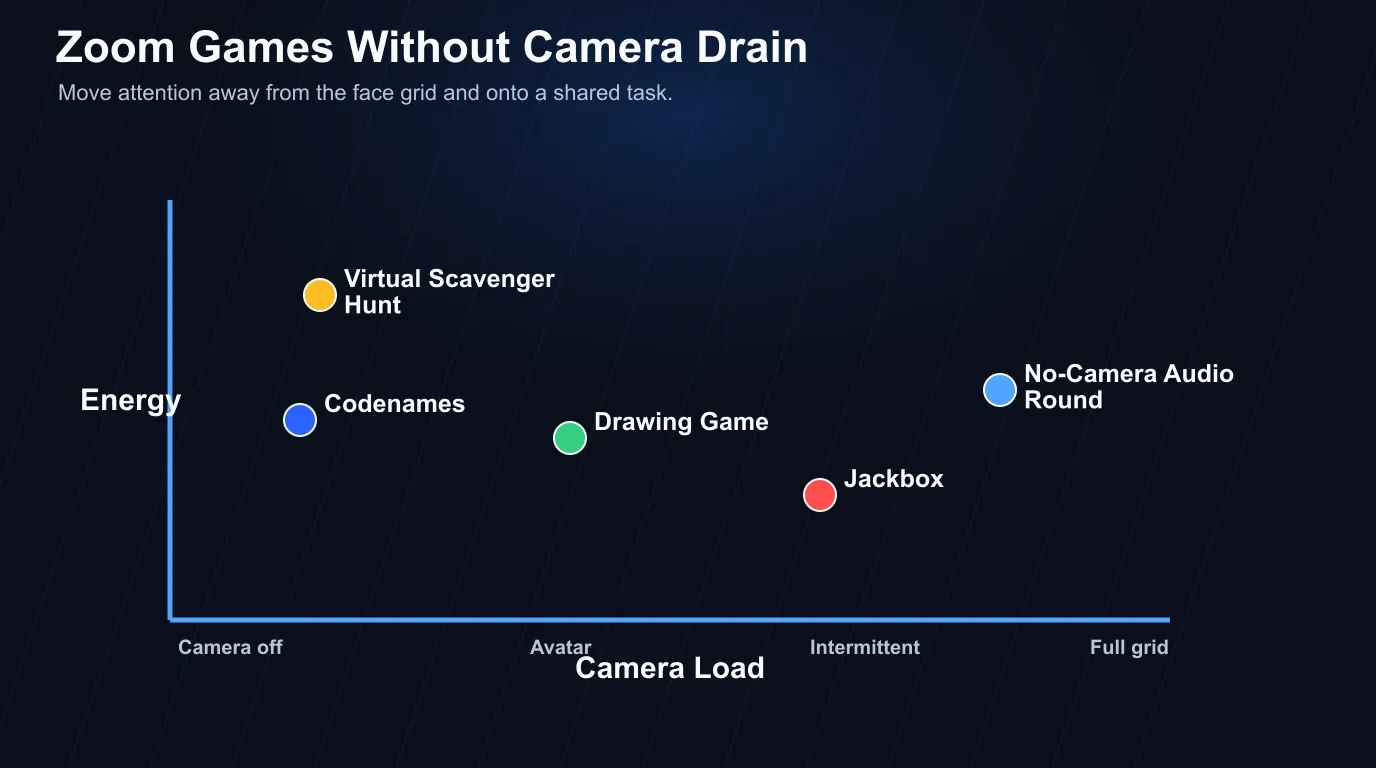 Strong Zoom games move attention off the face grid and onto a shared task.
10. Virtual scavenger hunt
Call out five household items and give the team five minutes; first person back with all five wins. Movement is the trick here, since it breaks the frozen webcam posture that makes calls drag. For the long version with 73 prompts, age-banded kid lists, and the Ringelmann 4-player team cap, see our virtual scavenger hunt guide.
Use ordinary items:
- a book with a number in the title
- a snack with red packaging
- a charging cable
- something that makes noise
- a receipt
11. Codenames
Codenames fits small teams that like to think: split into two groups, appoint spymasters, play one board. Cap it at 20 minutes, because past that the room goes quiet while two spymasters do most of the thinking.
12. Skribbl or Gartic Phone
Bad drawings are the point, so nobody has to be good, which is exactly why drawing games land. The catch is access friction: block external sites, or hand the team uneven device setups, and the game dies before round one. Test the link first.
13. Jackbox
Jackbox is funny once a team already trusts each other. With mixed seniority it gets dicey, since some prompts nudge people toward edgy jokes. Save it for after-work events rather than onboarding.
14. No-camera audio round
Pick a question, turn cameras off, and have the group answer audio-only while the host calls names in order. Self-view pressure drops, performative smiling stops, and after a video-heavy hour this might be the most humane entry on the whole list.
If the team is already drained, start here. If the room needs energy instead, start with the scavenger hunt.
Problem-Solving Games for New Teams
New teams usually need one shared task before a weekly ritual will stick. Problem-solving games do that job when roles emerge naturally: one person spots patterns, one asks clarifying questions, one tracks constraints, one makes the final call.
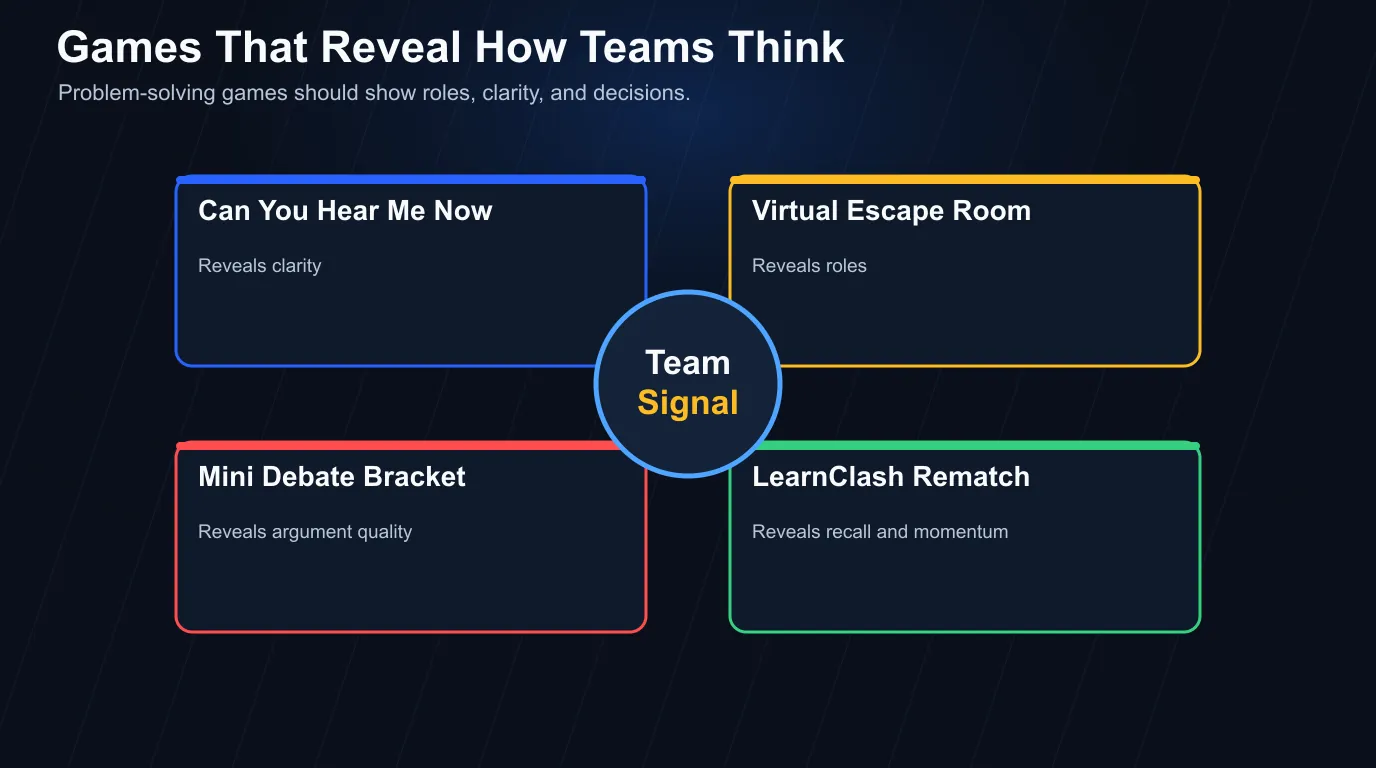
A 2021 randomized controlled trial on team video gaming found that teams assigned to play video games together improved posttest productivity more than control teams. That hardly makes every online game useful, but it sharpens the filter: focused interaction, shared rules, and a clear stop point.
15. Can You Hear Me Now
One person describes an image; everyone else draws it without seeing the original. Art is not the point, instruction quality is. People learn fast that “draw a triangle” is useless next to “draw a triangle with the flat side on top,” and because the failure is funny instead of embarrassing, it works as communication practice.
16. Virtual escape room
Virtual escape rooms cost real time and planning, and they earn it for an offsite or a new-cohort event. Run one when you want a single shared memory. Just do not make it a weekly habit; one hour is too heavy for routine team maintenance.
17. Mini debate bracket
Put four harmless choices into a bracket:
- coffee vs tea
- deep work vs fast replies
- meeting notes vs recording
- keyboard shortcuts vs mouse mastery
Pairs argue for 30 seconds each, the team votes, the winner advances. Pick topics that reveal style rather than create HR paperwork.
Which Virtual Team Building Games Should You Avoid?
Cut anything built on forced vulnerability, long camera performance, vague rules, or fake urgency. Remote teams already carry enough coordination cost. A good game makes the next work interaction easier; a bad one leaves people recovering from mandatory fun.
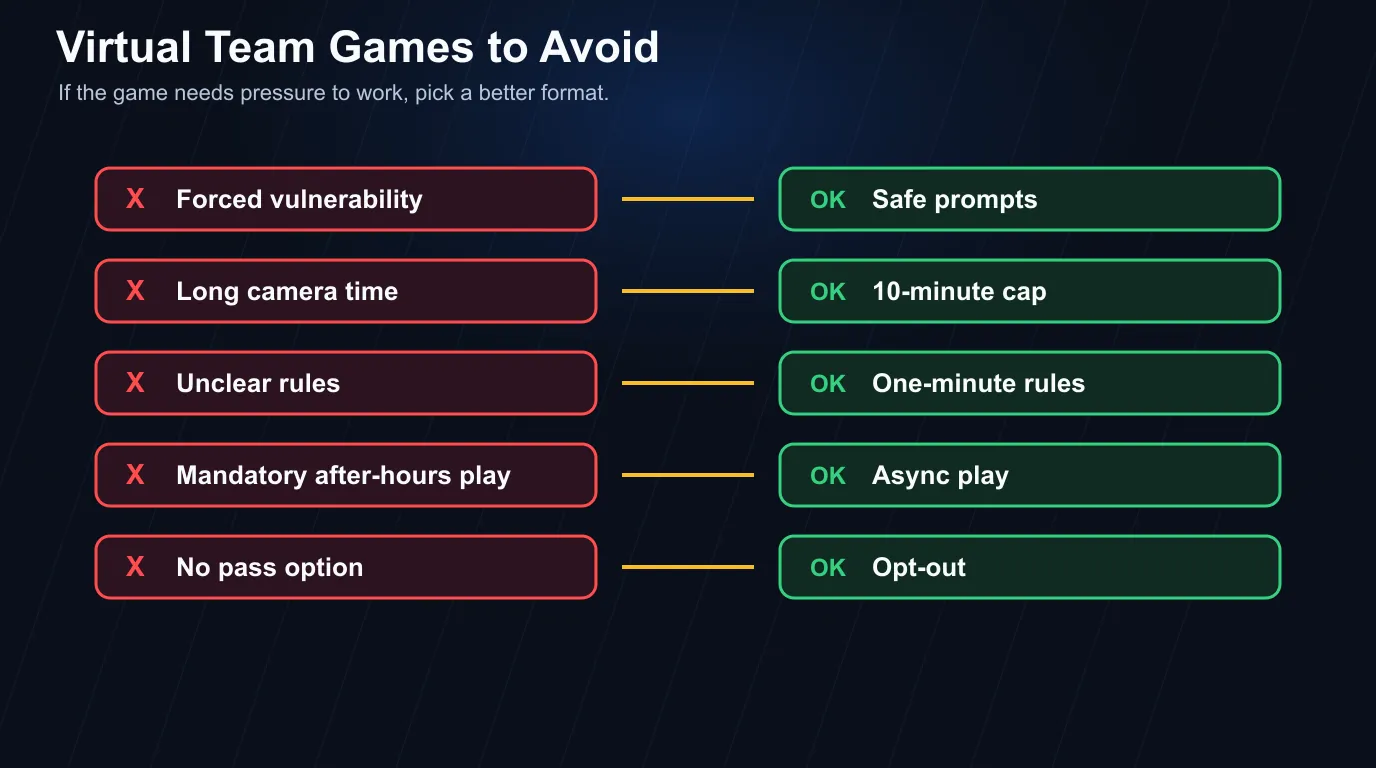 If the game needs pressure to work, it is the wrong game.
Avoid these five patterns:
| Red flag | Why it fails | Better swap |
|---|---|---|
| Forced “deep” questions | People perform safety instead of feeling it | Ice breaker prompts with pass options |
| Long virtual happy hours | After-hours time becomes work | 10-minute meeting opener |
| Camera-only games | Self-view fatigue builds fast | Audio or chat-based games |
| Complex game accounts | Setup eats the session | Browser or chat-native games |
| Winner-takes-all scoring | Quiet people disappear | Team or rotating-score formats |
Amy Edmondson’s psychological safety research defines it as a shared belief that the team is safe for interpersonal risk-taking, and that distinction does most of the work here. Compare “What childhood moment shaped you?” with “What tiny tool saved you time last week?” The first demands a reveal the group has not earned. The second invites a small, useful risk.
Competition passes the same test when its stakes are clear and bounded. A 3-minute duel with a visible score stays contained; a live meeting where one person gets mocked for blanking does not.
How to Run Virtual Team Building Without Adding Another Meeting
Treat virtual team building as a rhythm rather than an event: short turns, clear topics, visible results, no forced live attendance. Put connection inside the channels people already use before you ever send a new calendar invite.
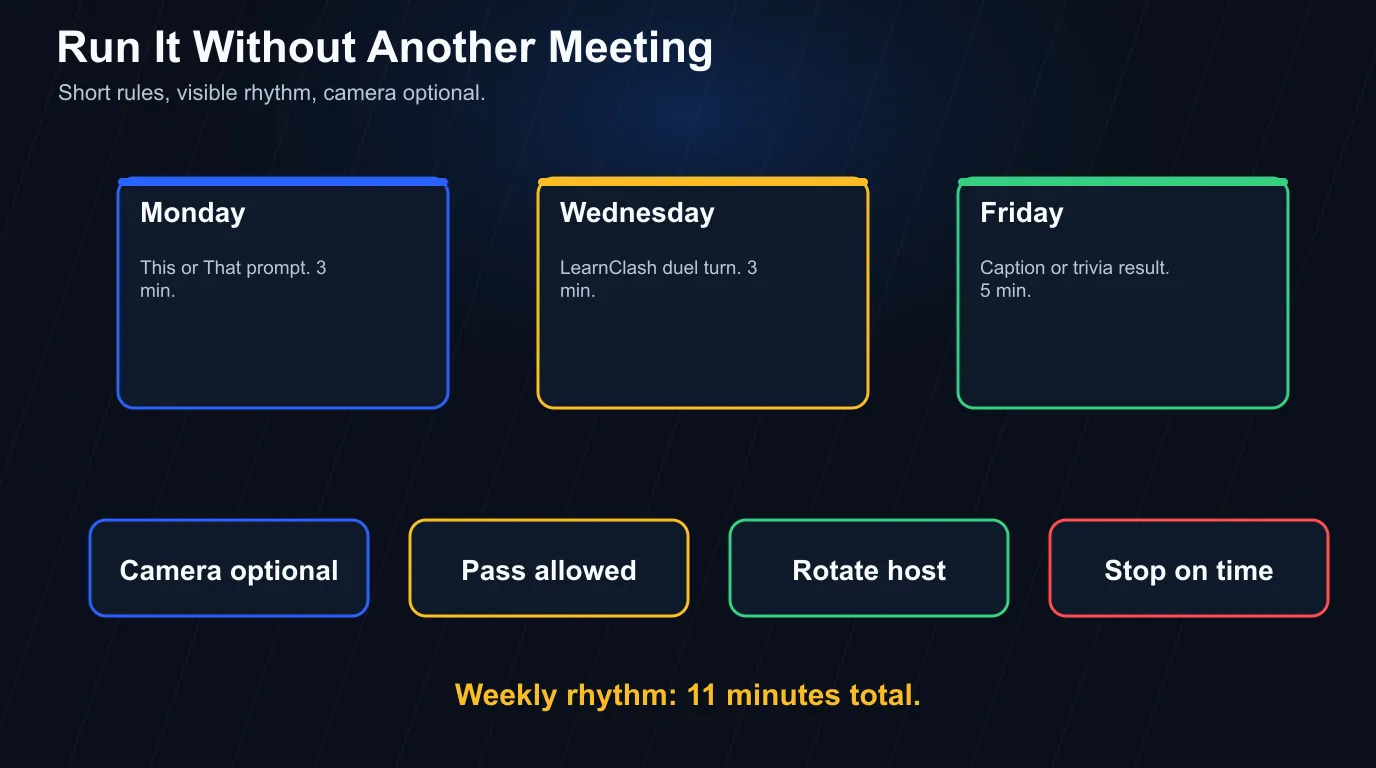
Use this playbook:
- Pick one goal: warmup, laughter, problem-solving, onboarding, or recurring competition.
- Cap live games at 10 minutes unless it is a named offsite.
- Make camera optional unless movement is the point.
- Put rules in the invite or chat before the game starts.
- Give people a pass option.
- Rotate the host weekly.
- Stop while people still like it.
“Which game is fun?” turns out to be the wrong question. The right one is “which version fits this team’s size and attention budget?” Common situations and the swap that fits:
| Situation | Fit | Why |
|---|---|---|
| Zero budget, zero prep | This or That, Caption Contest, Word Association | No vendor account, no setup, no payment |
| Five or six people who already know each other | Codenames, LearnClash duel, Desk Detective | Small groups can handle strategy and personal context |
| Thirty people on one call | Caption Contest, async scavenger thread, no-camera audio round | Large groups need parallel participation, not one speaker at a time |
| A work-safe default | LearnClash, Rose Thorn Bud, Mini Debate Bracket | Bounded stakes and a clear pass option |
| Q&A as a scored team game | LearnClash 139 Q&A questions with 1-3-5-7 confidence bet | Layer-2 prompts plus a wager round give a workplace-safe scoring loop without buying a tool |
| A game inside an existing meeting | Virtual scavenger hunt, This or That, no-camera audio round | Meeting games need short rules and a hard stop |
| Coworkers split across time zones | LearnClash async duel, weekly trivia ladder, Desk Detective | Async play means nobody waits on anyone else’s morning |
| The whole day already happens on Zoom | Scavenger hunt, Codenames, Skribbl, audio-only prompts | Zoom games need shared focus away from the face grid |
Then pick the delivery mode. For real teams with mixed schedules, that choice matters more than the game title.
- Async: distributed teams, low camera energy, recurring rituals. LearnClash, caption contests, scavenger threads, desk-photo guessing.
- Live: the team already has a meeting and needs a five-minute reset. This or That, Word Association, a short scavenger hunt.
- Hybrid: risky unless the rules give remote players the same turn. If the room shouts answers while the remote teammate waits on lag, the game has already failed.
- Large group: run parallel answers in chat first, then read a few. Never make 30 people wait while one person performs.
- Small group: strategy or reveal games. Codenames, Desk Detective, and Mini Debate Bracket need enough attention to work.
What the strong formats share is a quiet opt-in path: people can type, answer later, or pass without that choice becoming a scene. That is why a 3-minute async duel can beat a 45-minute live session that looks far more social on the calendar.
Gallup’s manager research puts managers at 70% of the variance in team-level engagement. That does not turn managers into party hosts. It puts them in charge of the conditions: clarity, trust, timing, and whether a ritual lands as respectful or forced.
A weekly rhythm worth copying:
| Day | Format | Time | Channel |
|---|---|---|---|
| Monday | This or That prompt | 3 min | Slack or Teams |
| Wednesday | LearnClash duel turn | 3 min | App |
| Friday | Caption Contest or trivia result | 5 min | Team meeting |
That is 11 minutes a week, and it beats a monthly 60-minute awkward call because repetition is what builds the inside joke. A huge event produces one memory. Small rituals produce a team language.
Match the Game to the Job
For a one-time event, choose whatever needs the least setup: This or That as a five-minute opener, Caption Contest for chat-native humor, a scavenger hunt for live energy, Can You Hear Me Now for communication practice. For a weekly connection loop, choose replay value, and that is the job LearnClash was built for: pick any topic, play a 3-minute turn, watch the score, rematch next week.
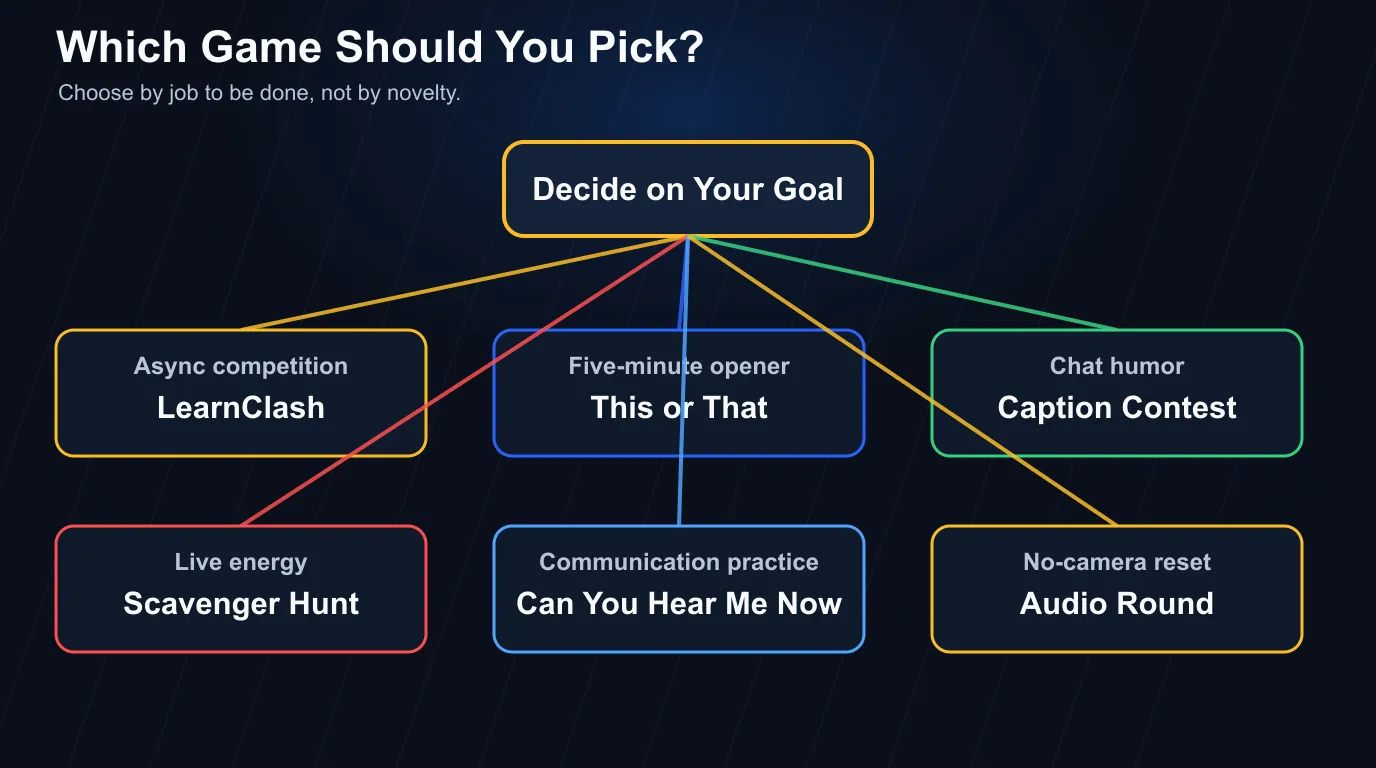 Most teams need a repeatable ritual more than another event.
Frequently Asked Questions
What are the best virtual team building games?
The best virtual team building games are short, easy to explain, and playable without forcing everyone onto camera. LearnClash works best for recurring async competition, while This or That, Word Association, Caption Contest, Codenames, and scavenger hunts work well for live meetings.
How long should a virtual team building game take?
A good virtual team building game should take 5 to 15 minutes inside an existing meeting, or run asynchronously over 24 to 72 hours. LearnClash uses 3-minute turns and a 72-hour window, which keeps the whole game off the meeting calendar.
What virtual team building games work for remote teams?
Remote teams need games that handle time zones, camera fatigue, and uneven speaking time. LearnClash async duels, caption contests, weekly trivia ladders, desk-photo guessing, and Slack scavenger hunts work well because people can join when they have a quiet moment.
What virtual team building games should managers avoid?
Avoid virtual games that force private disclosure, require long camera time, punish quiet people, or need 20 minutes of setup. LearnClash's filter is simple: the game must be clear in one minute, safe for mixed teams, and worth repeating next week.
Can virtual team building games improve teamwork?
Virtual team building games can improve teamwork when they create focused interaction, shared jokes, and low-risk participation. A 2021 randomized trial found team video gaming improved later productivity. LearnClash adds replay value through rematches, rating stakes, and spaced repetition.