
Gimkit Review [2026]: Live Quizzes, Pro, AI Generator
Gimkit review 2026: Pro $59.88/yr, free tier caps Pro Exclusive modes at 5 students, AI Question Generator. Every Gimkit number re-checked Aug 15, 2026.

Josh Feinsilber built Gimkit as a high-school class project in 2017. Nine years later the Seattle company still runs on a team of about eight people. The last usage number a founder put on the record is from May 2019, when co-founder Jeff Osborn counted 3 million monthly active users; Gimkit has published nothing newer. And the free tier still caps its most powerful modes at five students per game.
Gimkit is a live, web-based quiz platform: students answer questions to earn in-game cash, then spend it on upgrades, power-ups, and characters across a rotating catalogue of 2D game modes. Pro costs $14.99 per month or $59.88 per year. LearnClash, our own app, takes a third path entirely: async 1v1 quiz duels with a Glicko-2 rating ladder and spaced repetition in every session.
Prices below were read off Gimkit’s help center on August 15, 2026; where Gimkit publishes no number, I say so.
This review covers pricing, the mode catalogue, the AI question generator, the live-vs-async split, accessibility, cheating exposure, and who Gimkit is actually for.
Gimkit at a Glance: Quick Comparison
Four tools, four different bets. Gimkit bets on game-mode depth and a virtual economy. Blooket bets on free-tier generosity, Kahoot on its research record, and LearnClash on what happens after the bell: async play, rating-matched opponents, and spaced repetition.
| Feature | Gimkit | Blooket | Kahoot | LearnClash |
|---|---|---|---|---|
| Founded | 2017 (Seattle) | 2018 (US) | 2012 (Norway) | 2025 (Switzerland) |
| Core format | Live virtual economy | Live game show | Live quiz show | Async 1v1 duel |
| Free player cap | Unlimited (featured) / 5 (Pro Exclusive) | 60 (non-Plus modes) | 10 (personal plan) | Unlimited |
| Paid pricing | $14.99 mo / $59.88 yr | $9.99 mo Flex / $59.88 yr Plus | $19 mo (Kahoot! One, annual rate) | $7.99 mo / $59.99 yr |
| Game modes (active) | 13 (our May 2026 count) | 20+ (our July 2026 count) | 14 “experiences” (plan-dependent) | 3 (duel, practice, open) |
| AI question generation | Yes (Sept 2025) | Via Khanmigo (free, Khan Academy) | Yes (paid tiers) | Yes (any topic, any difficulty) |
| Asynchronous mode | Pro only (Assignments) | Yes (Solo) | Yes (free) | Yes (free) |
| Spaced repetition | No | No | No | Yes, 3-stage SRS |
| Rating ladder | No | No | No | Glicko-2, 8 tiers |
| Native mobile app | No (web only) | No (web only) | Yes | Yes (iOS, Android) |
| Ads | No | No | No | No |
| Best for | Middle-school live class | Free 60-player live | Research-backed K-8 | Async, self-directed |
Three of the four are live-first: the core product is a hosted session, and everything else hangs off it. That one design choice explains most of the rest of this review.
Gimkit Pricing in 2026: Pro, Free Tier, and the $5 Season Ticket
Gimkit Pro costs $14.99 per month or $59.88 per year, which works out to $4.99 per month on the annual plan (the Pro and Groups prices here come from Gimkit’s Pro FAQ, which the company last updated on May 20, 2026). The free Basic tier plays roughly three rotating featured modes with no plan-level player cap (Gimkit’s own hard limits still apply: 500 students in a live game, 60 in any 2D mode), but every Pro Exclusive mode is capped at 5 students per game.
Schools can skip per-teacher math entirely: Gimkit Groups runs $650 per year for a department of up to 20 teachers or $1,000 per year for a whole school. In between sits the $5-per-season Season Ticket, which adds 25 Creative slots and lifts Basic accounts to a 15-player cap on Pro modes.
The five-student cap is the detail everything else rests on. Run a Pro Exclusive mode on a Basic account and the lobby fills five seats, then stops. Blooket’s free tier hosts 60 players on every non-Plus mode, so the real free-tier comparison is not “5 vs 60” but “5 on the modes students ask for vs 60 on nearly everything”. Gimkit’s own Pro FAQ concedes the break-even: keep the tool in use past four months of the school year and annual wins.
| Tier | Cost | Player cap | Modes |
|---|---|---|---|
| Basic | Free | Unlimited (featured) / 5 (Pro Exclusive) | ~3 rotating featured |
| Season Ticket | $5 per season | 15 (Pro Exclusive) | Featured (unlimited) / Pro Exclusive at 15 |
| Pro monthly | $14.99 per month | Unlimited | All |
| Pro annual | $59.88 per year ($4.99 per mo) | Unlimited | All |
| Groups department | $650 per year | Unlimited | All, up to 20 teachers |
| Groups school | $1,000 per year | Unlimited | All, whole school |
Verdict: at $59.88 a year, Gimkit Pro now costs exactly what Blooket Plus costs since Blooket’s price rise, so the paid tiers no longer decide anything. The free tiers do. Blooket gives 60 players on every non-Plus mode; Gimkit gives unlimited players three rotating modes, and Basic is still built to push you to Pro after the first session of a Pro-locked mode.
13 Gimkit Modes (and Which Need Pro)
When I counted Gimkit’s mode picker in May 2026 it held 13 active 2D modes. Gimkit’s own marketing settles for “10+”. The only hard limits it prints are the caps, 500 students per live game and 60 in any 2D mode.
Which of them need Pro is a moving target by design: Gimkit keeps roughly three modes featured, free at any class size, and rotates the rest through the Pro Exclusive bucket every few weeks, so the week you host decides which ones cost money. The catalogue is Gimkit’s real moat against Kahoot, and the reason teachers tolerate the Pro price.
| Mode | What it is |
|---|---|
| Trust No One | Among Us-style social deduction: students run investigations, collect evidence, and vote out impostors |
| Don’t Look Down | Platformer that climbs vertically while students answer questions |
| Fishtopia | Top-down fishing economy: correct answers earn bait, fish sell for cash, cash buys upgrades and tickets to rarer waters |
| Snowbrawl | Top-down snowball combat; hosts tune how many snowballs a correct answer earns |
| Tag: Domination / Capture the Flag / Farmchain | Team modes running on energy earned per correct answer |
| Tycoon | The original 2017 loop, called Classic until mid-2024: answer, earn cash, buy upgrades |
Trust No One deserves its own note because it is the mode students ask for by name. Gimkit launched it on November 30, 2020, riding the Among Us wave. Classroom write-ups describe the same strain in big groups, vote-targeting and meeting spam, and the one host-side control for it is switching off student-called emergency meetings; past that, the lever is group size. The wider catalogue works the same way as its headline mode: genuinely deep, with access that rotates in and out of the free tier by the week.
The AI Question Generator
Gimkit announced its AI Question Generator on September 16, 2025, with a one-line pitch: say goodbye to writer’s block and hours spent making new kits. You type a topic in the Kit editor and it drafts questions and answers for you to review, edit, and add. Gimkit has not published a help-center article with finer specifics, so I am not going to invent any; the announcement itself is the primary source here.
The launch closed a real gap. Before it shipped, building a Kit meant typing every question by hand, importing a Quizlet set, or uploading a CSV, and the generator collapses all of that into one prompt. It also catches Gimkit up to Kahoot, whose generator sits in the paid tiers, and to Blooket, which has routed teachers through Khan Academy’s free Khanmigo since early 2025.
What it does not touch is the design ceiling. Gimkit’s AI writes a Kit, a static question pool you reuse in modes, and a question a student misses in that Kit today is not scheduled anywhere tomorrow. So the check worth doing before you host a generated Kit is the unglamorous one. Read every question, verify the facts against your own material, and cut distractors that give the answer away, because the generator drafts and the teacher still owns what reaches the class.
Live Class vs Assignments: Sync vs Async Workflow
A live Gimkit game needs a host. The teacher picks a kit and a mode, sets the game options, and projects a join code; students join on their own devices and answer at their own pace while the session runs.
There is no per-question countdown. Instead the host sets a game goal, a time limit, a cash target, or a number of questions answered, and the game ends when the goal is reached. Gimkit’s own hosting guide notes a time limit is the usual choice for 2D modes.
Free accounts get exactly two workflows out of that. Host live, or share a bare practice link that strips out modes, scoring, and reports. Assignments, the real async option where students play solo toward a goal you set, require Pro. On the free tier, Gimkit is sync, classroom-bound, and host-dependent by design.
| Workflow | Gimkit Free | Gimkit Pro | LearnClash Free |
|---|---|---|---|
| Live host required | Yes | Yes | No |
| Async homework | Practice links only (no modes, no reports) | Yes (Assignments) | Yes (duels + solo) |
| Pacing | Own pace inside a host-set game goal | Own pace inside a host-set game goal | 45-second shared clock per question; up to 72 hours per turn |
| Mobile-native app | No | No | Yes (iOS, Android) |
| Multi-day spacing | No | No | Yes (3-stage SRS) |
I built LearnClash’s loop around the opposite constraint. A duel deals 18 questions, and each turn can wait up to 72 hours. That number is a literal constant in our backend, DUEL_EXPIRY_HOURS = 72, and playing your first duel of the day adds 24 hours to your other waiting duels, so a player who keeps up never loses a good match.
Inside a turn the clock is short and shared: 45 seconds per question, for both players. Between turns, the calendar does the work a classroom timer cannot. A student fires off a duel on study topics on the bus, gets the reply at lunch, and the same 18 questions stretch across two days instead of seven minutes.
Gimkit’s sync model creates classroom energy no async tool matches. It also boxes the product into things that happen during class, and there is still no native mobile app.
Classroom Reality: Accessibility, Cheating, and What the Research Shows
The Gimkit research record is thinner than the marketing suggests, but it is not empty. A 2023 controlled study in Nurse Education in Practice found nursing students who reviewed with Gimkit outscored a question-and-answer control group. Most other published Gimkit work is descriptive classroom reporting. That is why the strongest quantitative evidence in this category belongs to Kahoot: a 2024 meta-analysis, run by research consultancy WiKIT on Kahoot’s behalf, screened 155 peer-reviewed independent Kahoot studies and measured a 0.72 standard-deviation learning gain across the 16 that met its quality bar.
Accessibility. Gimkit Live ships Read-to-Me, a per-student text-to-speech toggle that reads question text and answer choices aloud with synchronized highlighting. It runs only while a student is answering a question; Gimkit’s help page says it will not read the shop options or the correct-answer review. Berkeley Unified School District’s April 2024 web accessibility testing checklist recorded failing marks for Gimkit, so teachers running IEP accommodations should test their specific mode before assigning it.
Cheating exposure. Auto-answer browser extensions, bot flooders that join lobbies under fake names, and Trust No One role-revealers all exist. Gimkit’s hacking and cheating help article is candid that the defense is manual: it tells teachers to pull per-student reports, look for accuracy and completion times that seem too good, and watch whether performance drops when you stand nearby. So the practical mitigation is behavioral: walk the room, and save Trust No One for groups you can watch.
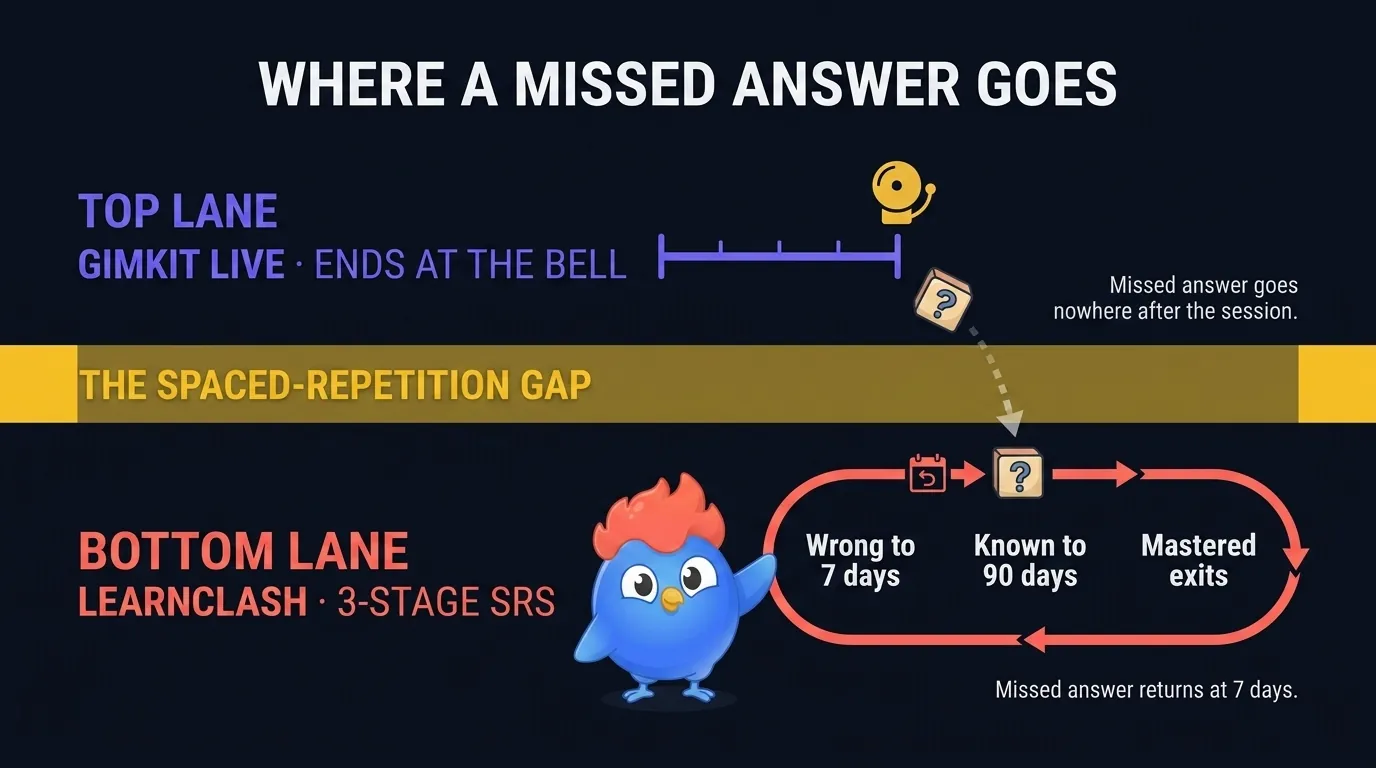
Retention. This is where the structural wedge sits. A Gimkit session ends when the bell rings, and a missed answer in Trust No One or an AI-generated Kit is not scheduled to come back next week; Gimkit’s Smart Repetition re-serves a missed question more often inside the same game, but its help page documents no carryover to the next session. LearnClash runs every mode through the same 3-stage ladder: a wrong answer returns after 7 days, a correct one is re-checked at 90, and clearing both marks the question Mastered. Gimkit has no cross-session scheduler, so every session is its own island.
Who Should Choose Gimkit
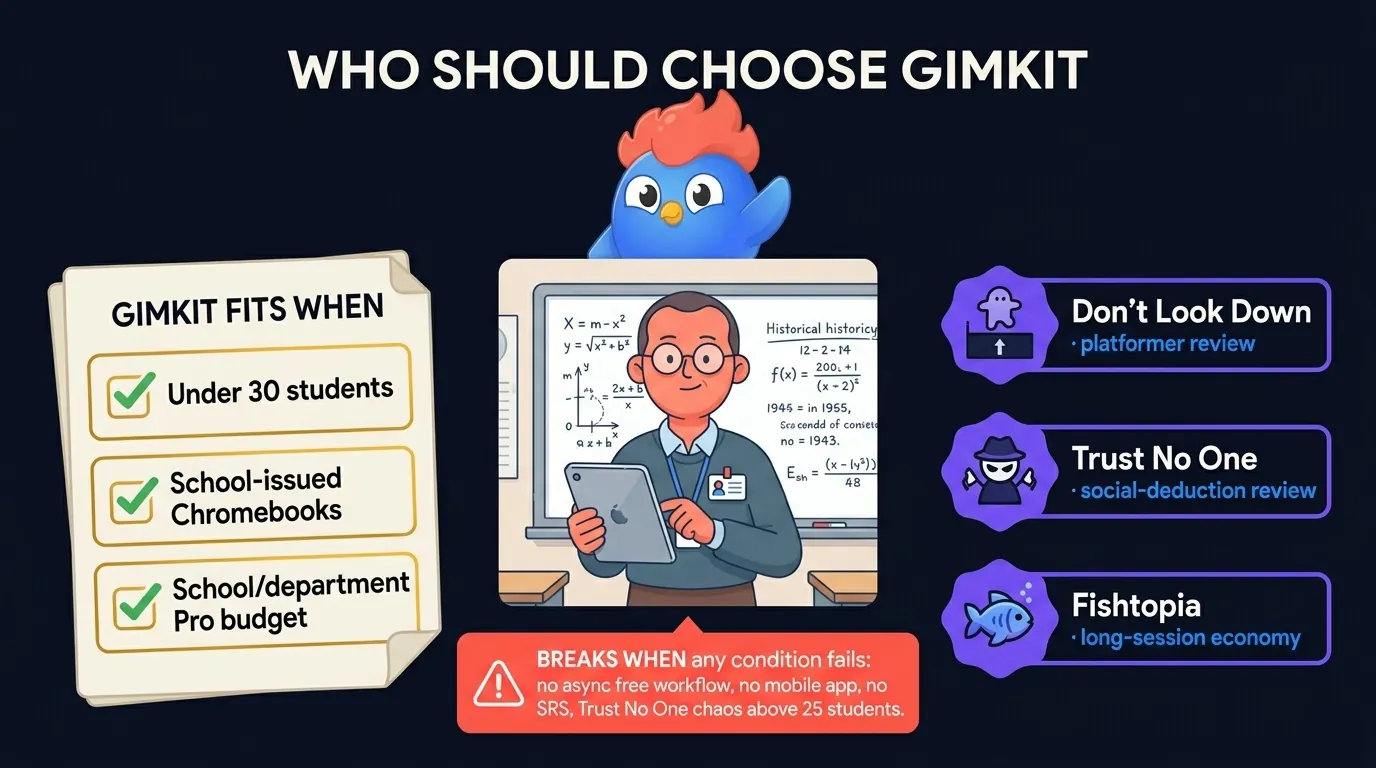
Gimkit is the right tool when three things are true at once: you teach live in a physical classroom, the class is comfortably under 30 students, and $59.88 a year of school or department budget exists for Pro. Middle school is the sweet spot, where the platformer modes and Trust No One re-engage students who tune out of standard quiz formats. If any of the three conditions breaks, one of the alternatives below fits better.
The clearest “yes” cases:
- Middle-school subject review in classes of 20-28 with school-issued Chromebooks
- Financial-literacy or strategic-thinking units where the earn-and-spend economy maps to course content
- End-of-unit energy day where Don’t Look Down or Snowbrawl re-engages a class burned out on flashcards
The “no” cases the marketing avoids:
- Self-directed practice outside class (no free async play, no mobile app)
- Long-term retention measurement (no spaced repetition, no cross-session scheduling)
- Class sizes above 30, where Trust No One’s classroom management breaks down
- Schools with strict accessibility-compliance requirements (see the April 2024 Berkeley checklist above)
Buy Pro if your classroom sits inside that band. Run Basic for a week first if you are not sure it does.
Who Should Choose Something Else
If the fit-band fails, three other tools each win on a single axis, and one fills the gap all three share.
- Need 60-player free games? Use Blooket. Every non-Plus mode, most of its 27 listed, hosts free at full size, and Plus now costs the same $59.88 a year as Gimkit Pro after Blooket’s price rise.
- Need the research record? Use Kahoot. The 0.72 standard-deviation meta-analysis and ESSA Level III certification are real evidence, at per-teacher prices that climb quickly across a department.
- Need async play, rating-matched opponents, and spaced repetition? Use LearnClash. 1v1 duels on any topic with 72-hour turn windows, a Glicko-2 ladder across eight tiers from Iron to Phoenix, and no teacher required; the trade is that there is no live whole-class show mode.
- Want self-paced practice with slides and lessons attached? Use Wayground (formerly Quizizz), which is stronger on lesson structure and weaker on live game-show energy.
Already ran the three-way Kahoot, Blooket, and Gimkit comparison? None of the three sync platforms ships spaced repetition, so the real decision is “pick the live tool that fits your class, then decide what handles retention once class ends”. A wider field of substitutes, including the ones without a 5-player cap, is in our games like Gimkit ranking.
Gimkit in 2026: One Narrow Yes
Gimkit in 2026 is a well-built synchronous quiz platform with the deepest mode catalogue in its class and vendor documentation that states its own limits. Its paid tier now costs exactly what Blooket’s does. Three structural gaps have not moved since we first tested it in spring: the free tier’s 5-student cap on the modes students actually request, async play locked behind Pro, and no scheduler that brings a missed question back days later.
That narrows the decision more than most reviews admit. Live class, under 30 students, Pro budget in hand: buy it and go teach.
If any of that is missing, settle one question before you compare anything else, namely what should happen to an answer a student misses after the bell. Gimkit’s answer is nothing once the session ends, and the tools that do something about it (ours included, free and ad-free on iOS and Android) look very different from a live quiz show. Pick for that, and the rest of the comparison table sorts itself out.
How we test
We use the tools we compare. That means installing the mobile apps on real iOS and Android devices, hosting test sessions in the browser tools, and joining from a second device as a participant, because free-tier limits usually show up on the join screen, not the marketing page.
Every number is dated. Prices, player caps, and plan names come from each vendor's own public pricing page or help center, read in a normal browser and recorded with the date we read them. When a claim cannot be re-verified on the vendor's site, we either date it to the last check that confirmed it or cut it. Quotes are verbatim from the cited page or they are not quotes. The last full re-check of every vendor claim on this page ran on August 15, 2026.
First-party data carries its export date. When we cite usage numbers from LearnClash itself, such as answer rates on specific questions, they come from dated production-database exports, and we put the export date and sample size next to the number.
Nobody pays to be here. No vendor has paid for placement or ranking in our comparisons, none sees a draft before publication, and there are no affiliate links in them. If that ever changes, this box will say so.
LearnClash is our own product. These comparisons are written by the person who builds it, which is a bias you should know about. We handle it in the open: our app is always labeled as ours, we do not stage tests designed to crown it, and every comparison names the situations where a competitor is the better pick. Read our app's entry as a founder's pitch with checkable numbers, and the rest as the dated re-checks they are.
Frequently asked questions
Is Gimkit free for teachers in 2026?
Gimkit Basic is free but caps Pro Exclusive modes at 5 students per game. Roughly three featured modes rotate free at unlimited size every few weeks, so whether your class's favorite mode is free this month depends on the rotation. Assignments always require Gimkit Pro at $14.99 per month or $59.88 per year. Blooket's free tier runs 60-player games on every non-Plus mode (6 of its 27 listed modes need Plus).
What does Gimkit Pro cost in 2026?
Gimkit Pro costs $14.99 per month or $59.88 per year ($4.99 per month on the annual plan). Pro opens every game mode at full player counts, the Assignments feature for asynchronous homework, and image and audio uploads in questions. Schools can buy Gimkit Groups instead: $650 per year for a department of up to 20 teachers or $1,000 per year for a whole school. The $5-per-season Season Ticket adds 25 Creative slots and a 15-player cap on Pro modes for Basic accounts.
Does Gimkit have an AI question generator?
Yes. Gimkit announced its AI Question Generator on September 16, 2025. Teachers enter a topic in the Kit editor and the generator drafts questions and answers to review and add to a Kit. LearnClash generates questions per duel on any topic and any difficulty without a bulk Kit assembly step.
Is Gimkit better than Kahoot or Blooket?
Gimkit beats Kahoot on game-mode depth and beats Blooket on assignment support, but Blooket's free tier is more generous and Kahoot has the strongest research record: a 2024 meta-analysis of independent studies, run by research consultancy WiKIT on Kahoot's behalf, measured a 0.72 standard-deviation learning gain across 16 qualifying studies. LearnClash adds 3-stage spaced repetition (wrong returns at 7 days, known at 90 days, mastered exits) that none of the three offer.
Can students play Gimkit at home or only in class?
Live Gimkit games require a host running a real-time session, so students cannot play live solo. Gimkit Assignments let students play asynchronously from any device, but Assignments require a Gimkit Pro account; free accounts can only share bare practice links with no game modes or scoring. LearnClash duels run async with 72-hour turn windows on the free tier.